


Behind the court decisions, legislative texts, and other legal documents available online, editorial teams work tirelessly to prepare them and make them available to the public on the websites or intranets of the organizations they represent.
However, preparing a document and publishing it are two distinct tasks that do not always follow one another immediately. A document may be completely ready, yet its publication is not scheduled until several hours, or even several days, later.
Until recently, this often meant someone had to step in at the scheduled time to make the content public. With the latest update to Norma, our platform for managing, enriching, and publishing legal information, this task can now be planned in advance.
Released on September 15, Norma 7.11 introduces the Publication Scheduler, a new feature that allows teams to schedule when content should be published, or taken offline, without requiring someone to make the change manually at that time.
How do you schedule a publication?
The Publication Scheduler is not enabled by default. Organizations that would like to use it must first request activation from the Norma support team.
Once enabled, scheduling is handled directly from the form used to add or edit content.
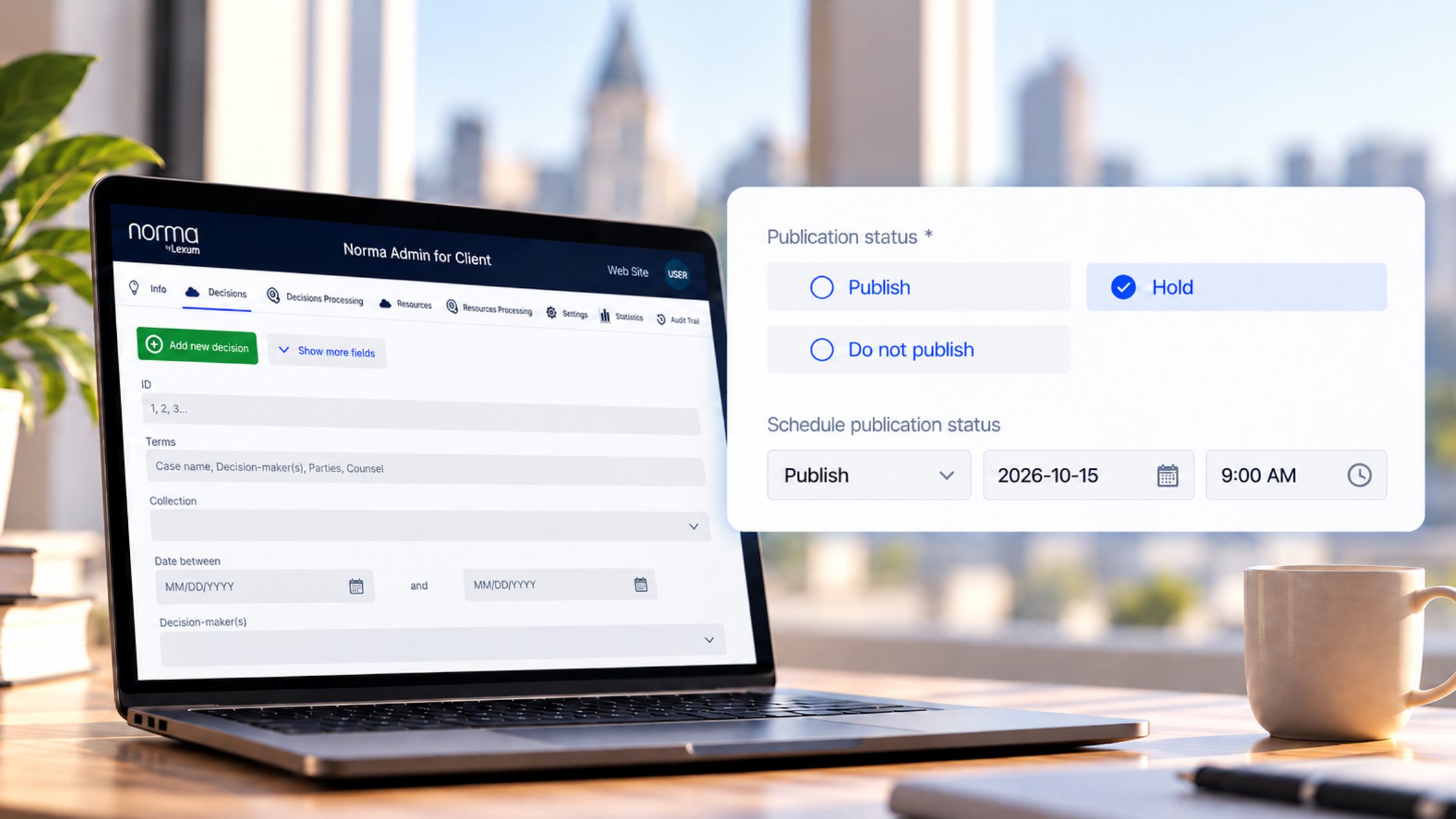
The document is prepared as usual and saved with a non-public status, such as “Hold” or “Do Not Publish.”
From the scheduler, users can then select the future “Publish” status and specify the desired date and time.
Until the scheduled time is reached, the document remains non-public. This means content can be fully prepared and saved in Norma without being visible to readers. Once the scheduled time arrives, Norma takes care of the status change.
What about scheduling content to be unpublished?
The scheduler also works in the opposite direction. Content that is already public can be scheduled to be taken offline at a later moment.
In this case, the starting point is a published document. From the scheduler, users select the future non-public status, “Hold” or “Do Not Publish”, and specify the desired date and time.
The document remains accessible until the scheduled status change is applied.
Whether content is being published or unpublished, the scope of the feature is intentionally specific: the scheduler only changes the publication status. It does not modify the document itself or any of the information associated with it.
When does the status change take effect?
The scheduler runs on a regular checking cycle.
Every 15 minutes, at 00, 15, 30, and 45 minutes past the hour, Norma checks whether a scheduled status change is due.
The date and time entered therefore indicate when the change becomes eligible to be applied, rather than guaranteeing that it will occur at that exact minute. If a scheduled time falls between two checks, the publication or unpublication will be processed during the next one.
This process also allows Norma to pick up any pending changes during a later check if a temporary interruption occurs.
What if several documents need to be published?
Multiple items can be scheduled for the same date and time. For now, however, each item must be scheduled individually.
It is not yet possible to select several documents and schedule their status changes in a single operation. There is currently no defined limit on the number of items that can use the scheduler.
A small automation that can make a meaningful difference
The Publication Scheduler automates one very specific step in the process: when content becomes public, or stops being public.
For teams responsible for publishing legal information, this means a document can be fully prepared and its publication scheduled at the same time, even when those two steps need to happen at different moments. That is one less manual task to keep track of.
To learn more about Norma or the Publication Scheduler, or to request activation for an existing installation, get in touch with us.