



The next time you visit www.canlii.org, you’ll notice a revamped home page, with a cleaner, more polished design. But beyond this visual update, the essentials remain unchanged. The classic search engine remains at the heart of the experience, and access to the well-known sections of the home page, including primary sources of law, commentary and the CanLII blog, remains unchanged. In other words, the site’s main landmarks are still there. If you use CanLII to find a document quickly, you can continue to do so as before.
The biggest changes are to be found in myCanLII. Until now, this personal space existed in a separate environment. Now, its main functions are integrated directly into the CanLII experience. Searching and saving documents, creating research folders, setting up alerts, managing your profile and accessing CanLII Search+ are now all part of a simpler, smoother and more coherent workflow.
In this article, we take a closer look at what these changes mean in concrete terms for your use of CanLII and myCanLII.
A new version of myCanLII, better integrated into the CanLII experience
For a long time, myCanLII functioned as a distinct environment. To access your search folders, saved documents, alert feeds or profile, you had to leave the CanLII home page and switch to a separate area. The functionalities were there, but this separation made the journey less fluid. This is precisely what the new version changes. myCanLII is no longer a separate workspace: its main functionalities are now integrated directly into the CanLII experience. The aim is simple: to make the journey smoother, more intuitive and more coherent for connected users.
This integration is first apparent on the home page. Once logged in, users can find a section presenting their three recently created or modified search folders, as well as another highlighting their three most recently updated alert feeds. The home page thus becomes a more personalized entry point, making it easier for the user to pick up his research where he left it off.
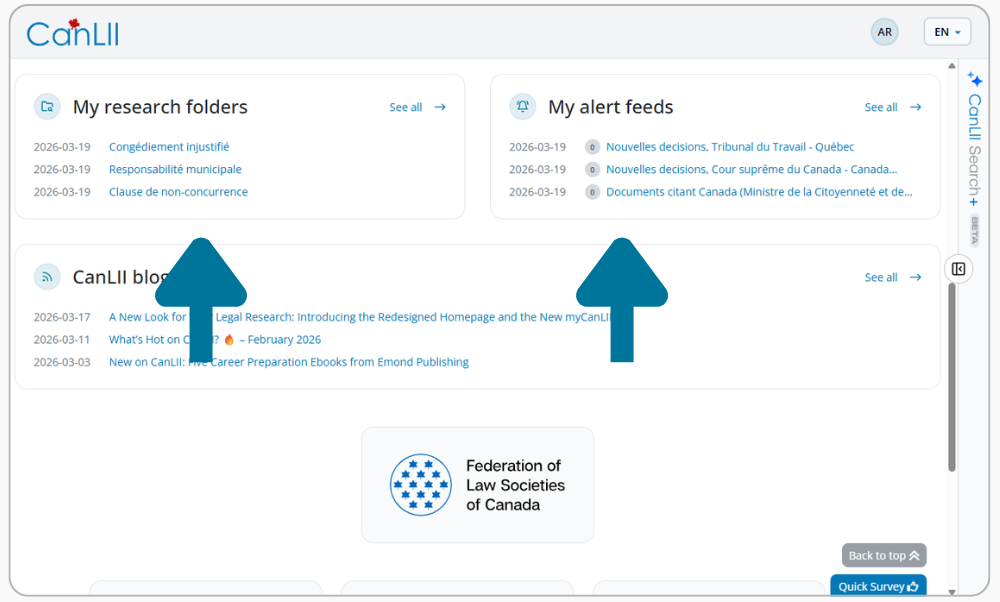
Figure 1: “My research folders” and “My alert feeds” sections
This aim for simplification is also reflected in how users access the account itself. Previously, there were two separate links for signing up and logging in. Now, there is a single entry point in the top-right corner: the “Log In” button. Once clicked, it opens a login window that also provides access to the “Create an account” link for those who wish to sign up.
The top of the page has also been redesigned in the same spirit. The old user menu has been replaced by a new circular icon displaying your initials. Clicking on it opens a drop-down menu giving clearer access to your functionalities, profile settings and sign out option. The profile itself now offers more possibilities for personalization, including the addition of a photo.
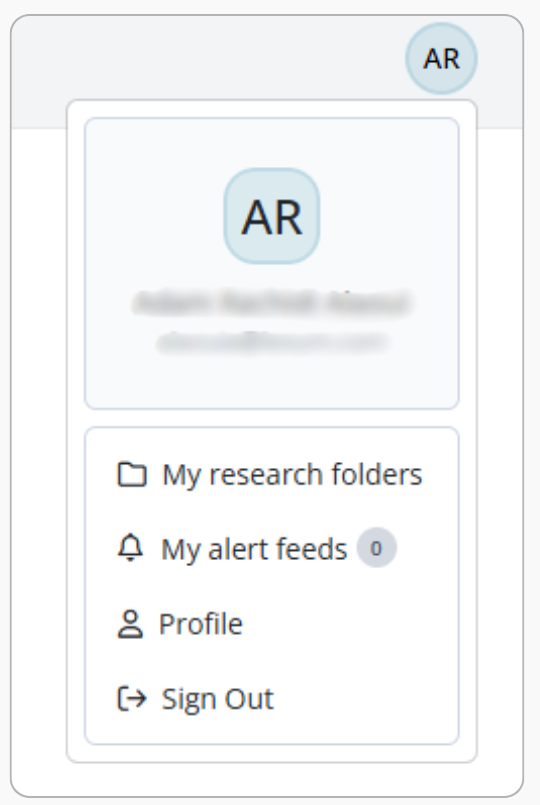
Figure 2: New user menu
But integration doesn’t stop at the home page. It extends to where the work is actually done: on documents. A new option in the interactive sidebar lets you immediately see in which research folder a document has already been saved. You no longer need to leave the page to find the context of your organization: it now follows you wherever you consult the information. The same logic applies to alerts. From a document page, it is also possible to view the flow of alerts linked to decisions citing this document, and not just the decisions themselves. This brings useful information closer to where you need it.
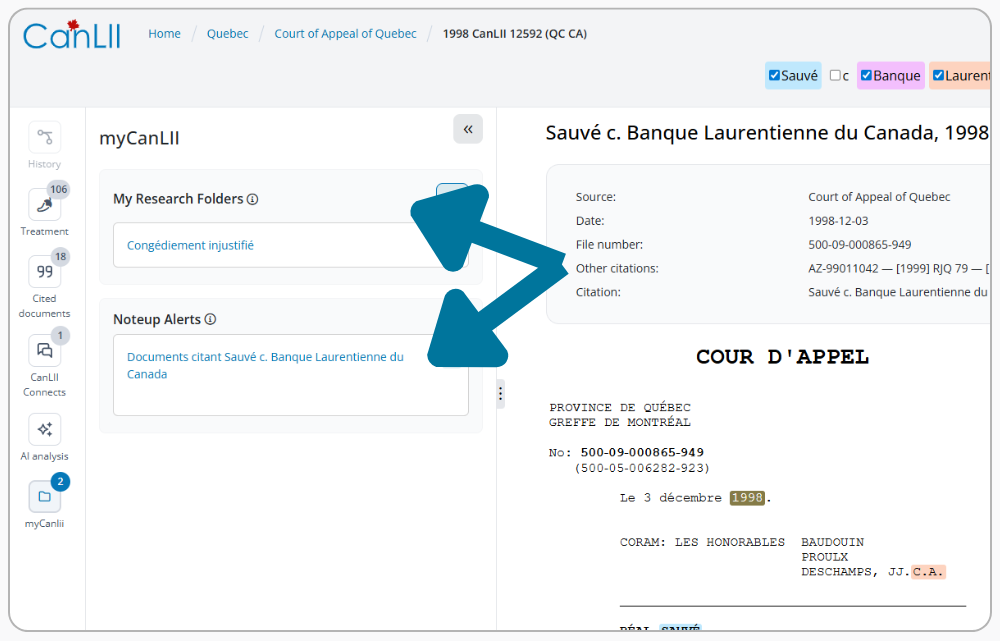
Figure 3: myCanLII features integrated into the interactive sidebar of document pages
This development is also reflected in an enhancement to the alert system with the addition of a new type of alert: the collection alert. This feature allows users to track new additions and recent changes to decisions within a specific collection. To create such an alert, simply go to the page of the desired collection, for example, that of the Supreme Court of Canada, and click the button represented by a bell icon. Users can then choose to be notified either of new decisions added to the collection or of changes made to existing decisions. This new type of alert expands the monitoring capabilities offered by CanLII and allows for more precise tracking of changes to specific document collections.
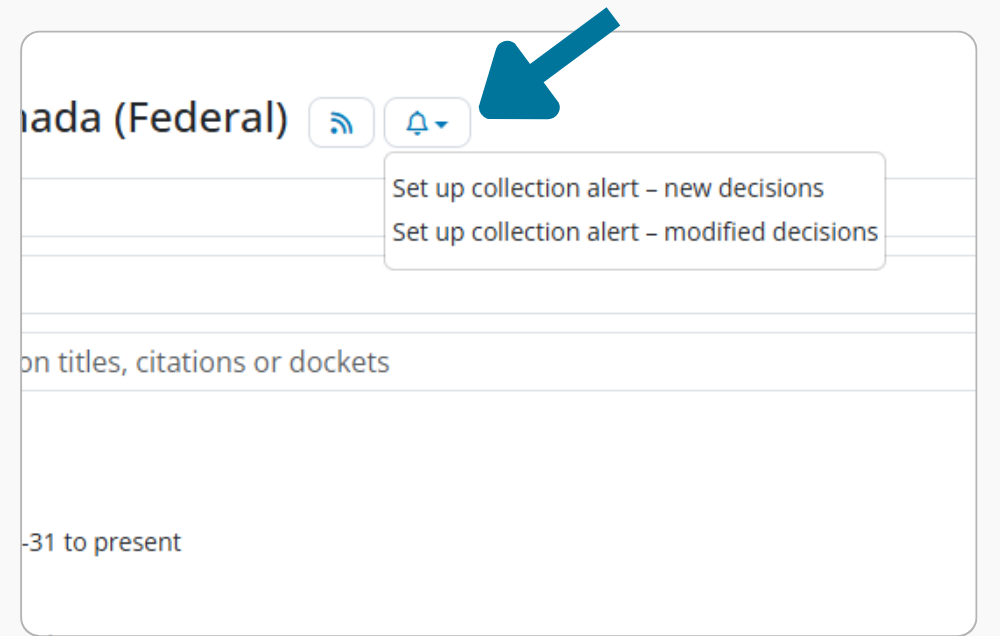
Figure 4: Collections alert
CanLII Search+ finds its place in this new environment
This redesign does not only concern the organization of existing functionalities. It also creates a more coherent framework for CanLII Search+, CanLII’s brand new research assistant powered by artificial intelligence.
Accessible via a myCanLII account, the feature is offered in a free version with limited usage quotas, designed for occasional to moderate use. This approach helps us to better manage the service’s operating costs while keeping it widely accessible.
But this integration also serves a broader purpose. The rollout of this new version of myCanLII supports the ongoing development of CanLII Search+. By integrating it more directly into the main environment used by logged-in users, CanLII establishes a more consistent foundation for evolving this feature over time.
Enhanced security with two-factor authentication (2FA)
With the integration of myCanLII into the CanLII experience, it also became important to offer stronger ways to protect access to accounts. That is why two-factor authentication (2FA) is now available. In addition to your password, it adds a second verification step when you log in. Even if a password is compromised, this measure makes it much more difficult for an unauthorized person to access your account.
You can activate two-factor authentication from the user menu at the top of the page. Simply click on Profile, then scroll down to the Security section. By default, the option is deactivated. Once enabled, it adds an extra step: after entering your password, you’ll need to enter a temporary six-digit code generated by an authentication application such as Google Authenticator or Microsoft Authenticator.
Activation is simple: choose “Activate 2FA”, scan a QR code (or enter the key manually), then enter the generated code to finalize the configuration.
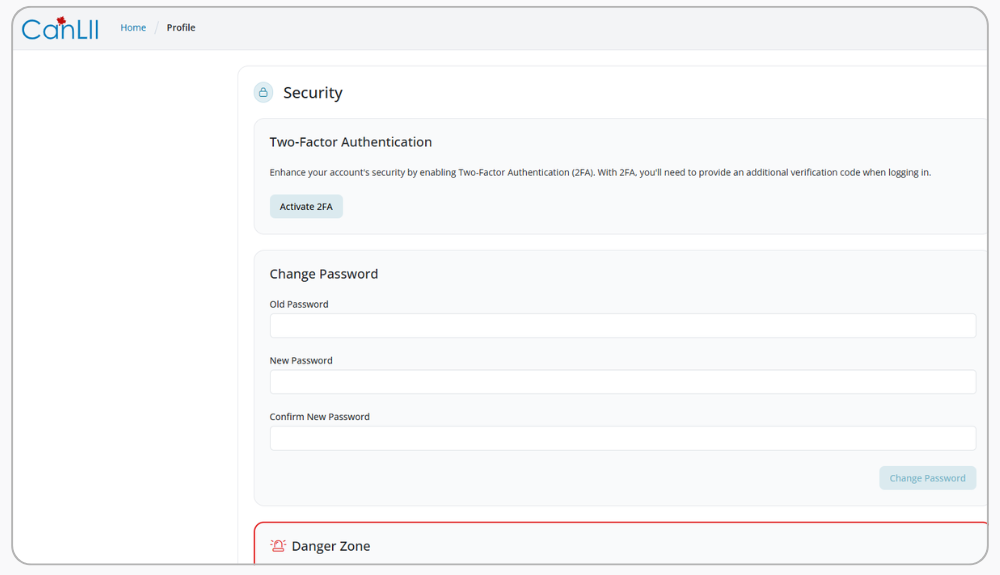
Figure 5: Two-factor authentication (2FA) setup
A user guide to support the transition
When an experience evolves, it’s just as important to help users find their way around as it is to add new features. With this in mind, a user guide is now available at the bottom of the CanLII page.
Although it will be subject to further revisions in the coming days and weeks, it already represents a major innovation. No equivalent guide existed before. It will help users to better discover the functionalities offered within a now more integrated environment.
What has been migrated, and what is no longer part of this version
As with all major developments, this new version is also accompanied by conscious choices. Integrating myCanLII more fully into the CanLII experience means both retaining what’s essential and revising certain functionalities.
Certain contents of your existing myCanLII account are automatically transferred to the new version. This includes your CanLII alerts (and their associated notes), your saved CanLII documents (and their notes), and your research folders containing CanLII documents (with their associated notes). All this is available as soon as you log in, with no action required.
On the other hand, some features of the old myCanLII are not included in this version, notably the addition of personal documents, the insertion of RefLex links, annotations, the saving of search queries and integration with Clio. These decisions are part of a process of simplification and modernization focused on the most important uses.
To support the transition, the old myCanLII account will remain accessible in read-only mode for a year after the rollout, so that you can view content that has not been migrated.
Our goal remains to make CanLII the best possible resource for your legal research. With this in mind, we will continue to evaluate the performance of certain features and the development of new ones over time, based on your needs and usage patterns.
A new era for CanLII
At its core, this redesign is based on a simple idea: evolve CanLII to better support the way you actually work.
The experience has become simpler, more fluid and more coherent. myCanLII is now fully integrated into CanLII, and CanLII Search+ fits more naturally into this environment. The tools are more accessible, the workflow more seamless, and the whole system has been designed to better support day-to-day research and organization.
And this is just the beginning. We will continue to improve the experience based on your needs and feedback.